
Phillip Capital Public API (1.0.0)
Download OpenAPI specification:
Base URL: https://api.phillipcapital.com.au Authentication: OAuth 2.0 Client Credentials
Welcome to the Phillip Capital Public API documentation.
Our APIs provide secure, scalable, and reliable access to the data and services provided by Phillip Capital. Built with modern infrastructure and industry standards in mind, these APIs are designed for fast, efficient integration with your systems. Key features include:
- Scalability to support high-volume transactions and data processing
- Security via OAuth 2.0 authentication and TLS encryption
- Flexibility to support diverse integration use cases
- Reliability backed by Phillip Capitals’s proven financial systems expertise
This documentation provides detailed information on authentication, usage, versioning, and available endpoints. For more information or to request access to the API, please contact your Phillip Capital representative.
We're always looking to improve our APIs and services. If you have any feedback or suggestions, please let us know.
A REST API (or Representational State Transfer API) is a method for two systems to communicate and share data over the internet, adhering to a standardized set of rules. In simpler terms, it’s a way for applications to talk to each other, allowing them to exchange information in a consistent and reliable manner.
A REST API is an API that communicates using the HTTP protocol, where different resources (such as data or services) are accessible via specific web addresses (URLs). Each URL represents a resource, which could be anything from ledger data to contract note copies.
By leveraging REST APIs, systems can efficiently expose data and functionality, ensuring a seamless, reliable exchange of information across distributed platforms.
We utilise the OAuth 2.0 "Client Credentials" flow to ensure secure access to our APIs. This industry-standard authentication protocol allows systems to authenticate and communicate securely without involving user interaction, making it ideal for server-to-server integrations.
How It Works
In the Client Credentials flow, an application (the client) requests an access token directly from the authentication server (Identity Provider, or IdP) using its own credentials. This access token is then used to authorise API requests. Here’s a step-by-step overview:
- Client Authentication: The client authenticates with the Identity Provider using a unique client ID and secret. These credentials are issued by the Phillip Capital authentication system when your application is registered.
- Access Token Request:
Once authenticated, the client requests an access token by calling the token endpoint of the IdP. This request
includes the client ID, client secret, scope, and a grant type of
client_credentials. - Access Token Issuance: If the client is successfully authenticated, the Identity Provider returns an access token. This token is a time-limited key that the client can use to make authorised API calls.
- Authorised API Requests: The client then includes the access token in the header of subsequent API requests, typically in the form of a Bearer token. The API verifies the token before processing the request, ensuring that the client is authorised to access the requested resource.
Scopes
Scopes are used to specify the level of access that you have when making API requests. When requesting an access token, you can include specific scopes to indicate which resources or actions you want to access.
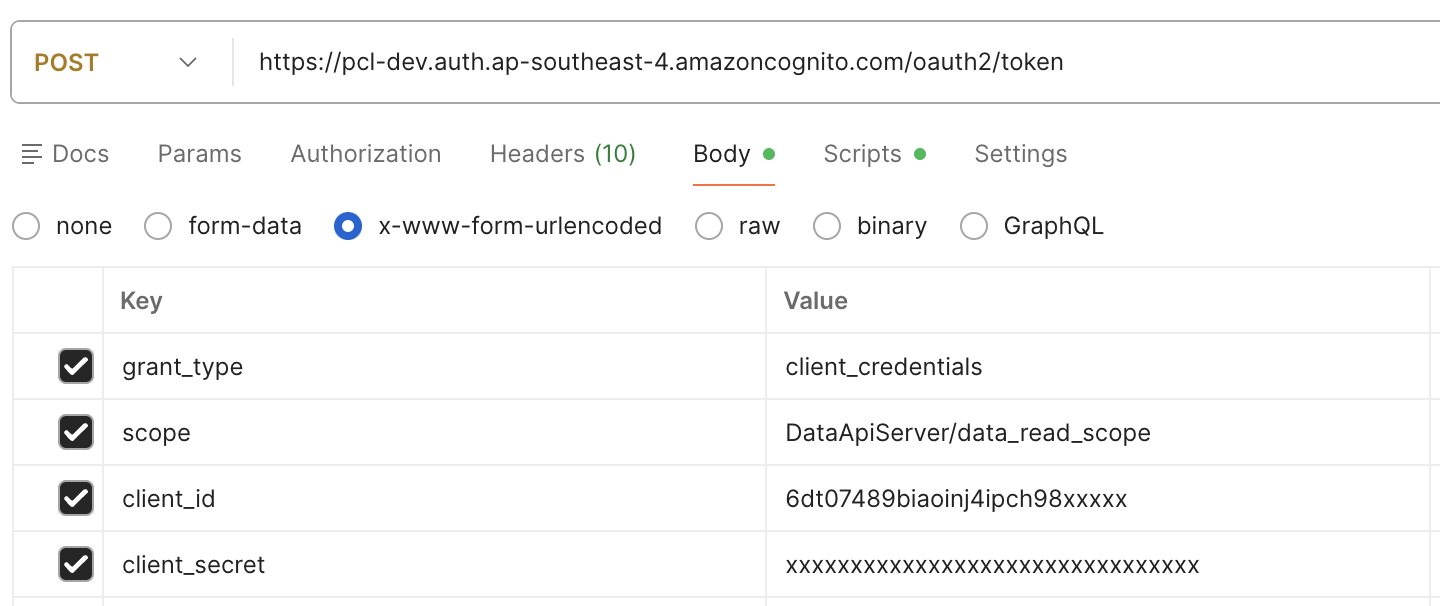
For example, if you want to read ledger data, you would request an access token with the
DataApiServer/data_read_scope scope. This helps ensure that your application only has access to the resources
it needs, following the principle of least privilege. This screenshot from Postman illustrates how to include scopes in the token request:
Not all scopes may be available to all clients. The scopes that you can request will depend on the permissions granted to your client ID by Phillip Capital. If you attempt to request a scope that your client ID does not have access to, the Identity Provider will return an error when you try to obtain an access token.
The table below describes the available scopes.
| Scope Name | Description |
|---|---|
DataApiServer/data_read_scope |
Grants read-only access to data endpoints such as ledgers, holdings, contract notes, and corporate actions. |
DataApiServer/order_write_scope |
Grants permission to create and manage orders through the Orders API. |
DataApiServer/advisor_read_scope |
Allows access to advisor information and linked accounts. |
DataApiServer/advice_write_scope |
Permits uploading Records of Advice (ROA) and tracking their status. |
DataApiServer/onboarding_write_scope |
Enables the creation of new account applications through the Onboarding API. |
Example
Obtaining an access token and using it to make a secure API call is a two-step process.
1). Requesting an Access Token
curl -X POST https://oauth.phillipcapital.com.au/oauth2/token \
-u client_id:client_secret \
-d 'grant_type=client_credentials&scope=DataApiServer/data_read_scope'
This request sends the client ID, client secret, and grant type to the token endpoint. If the credentials are valid, the Identity Provider responds with an access token:
{\"access_token\":\"9zjf....90823kjns\", \"token_type\":\"bearer\",\"expires_in\":3600}
2). Making an Authorised API Call Once you receive the access token, include it in the Authorisation header of your API requests:
curl -k -X GET https://api.phillipcapital.com.au/ledgers?accountNumber=123456 \
--header 'Accept: application/json' \
--header 'Authorization: Bearer k9fk32......9238kmsq2' \
--header 'Content-Type: application/json'
All communication between your application and Phillip Capital must be encrypted using TLS to protect sensitive data like the client secrets. Access tokens are short-lived to minimise the risk of token misuse in the event of a security breach.
By using OAuth 2.0, Phillip Capital ensures that your application can interact with our APIs in a secure, scalable, and standardised way, without exposing unnecessary risk to either party.
Retrieve advisor details and the accounts linked to an advisor.
Use these endpoints to power advisor-based experiences such as searching for an advisor, listing the accounts they manage, and driving downstream workflows that require an advisor context.
List all advisors
Retrieves a paginated list of advisors accessible to the authenticated client.
Results can be filtered by subscription type and paginated using the page and size parameters.
Authorizations:
query Parameters
| advisorSubscription | string Example: advisorSubscription=PREMIUM Filter advisors by subscription type |
| page | integer >= 0 Default: 0 Example: page=0 Page number (zero-based) |
| size | integer [ 1 .. 500 ] Default: 100 Example: size=100 Number of records per page |
header Parameters
| X-Request-ID | string <uuid> Example: 550e8400-e29b-41d4-a716-446655440000 Optional request correlation ID for tracing and debugging. If provided, this ID will be returned in the response headers and included in logs. |
| X-Client-Identity required | string Example: partner-app-123 Identity of the calling client application |
Responses
Response samples
- 200
- 400
- 401
- 500
{- "status": "success",
- "content": [
- {
- "advisorCode": "string",
- "email": "user@example.com",
- "branchCode": "string"
}
], - "code": "string",
- "message": "string"
}List accounts for a specific advisor
Retrieves a paginated list of accounts managed by the specified advisor.
Results are sorted and paginated according to the provided parameters.
Authorizations:
path Parameters
| advisorCode required | string Example: ABC Advisor code |
query Parameters
| page | integer >= 0 Default: 0 Example: page=0 Page number (zero-based) |
| size | integer [ 1 .. 500 ] Default: 50 Example: size=50 Number of records per page |
| sortColumn | string Default: "accountNumber" Enum: "accountNumber" "displayName" "createdDate" Example: sortColumn=accountNumber Column to sort results by |
| sortDirection | string Default: "asc" Enum: "asc" "desc" Example: sortDirection=asc Sort direction |
header Parameters
| X-Request-ID | string <uuid> Example: 550e8400-e29b-41d4-a716-446655440000 Optional request correlation ID for tracing and debugging. If provided, this ID will be returned in the response headers and included in logs. |
Responses
Response samples
- 200
- 400
- 401
- 404
- 500
{- "status": "success",
- "content": {
- "advisorCode": "string",
- "content": [
- "string"
]
}, - "pagination": {
- "page": 0,
- "size": 0,
- "totalPages": 0,
- "totalElements": 0
}, - "code": "string",
- "message": "string"
}Upload a Record of Advice (ROA) and track its processing status.
Use these endpoints to submit ROA documents with the required metadata, then query the current status as the document moves through review and approval steps.
Upload a Record of Advice (ROA)
Uploads a Record of Advice document for a client account.
The ROA document must be submitted as a multipart form with the PDF file and associated metadata. Upon successful upload, the system returns a unique ROA ID that can be used to track the approval status.
Supported File Types
- PDF documents only
- Maximum file size: 10MB
Processing Workflow
- Document is uploaded and validated
- ROA enters
NEWstatus - Compliance review moves it to
PENDING_APPROVAL - Final status will be
APPROVED,REJECTED, orPROCESSED
Authorizations:
header Parameters
| X-Request-ID | string <uuid> Example: 550e8400-e29b-41d4-a716-446655440000 Optional request correlation ID for tracing and debugging. If provided, this ID will be returned in the response headers and included in logs. |
Request Body schema: multipart/form-datarequired
ROA document and metadata
| advisorCode required | string Advisor code of the advisor submitting the ROA |
| accountId required | string Account number the ROA applies to |
| file required | string <binary> The ROA document (PDF format, max 10MB) |
| name required | string Name of the person submitting the ROA |
| email required | string <email> Email address for ROA status notifications |
Responses
Response samples
- 200
- 400
- 401
- 403
- 413
- 500
{- "roaId": "550e8400-e29b-41d4-a716-446655440000",
- "message": "ROA uploaded successfully and pending review"
}Check ROA status
Retrieves the current status of a previously submitted Record of Advice.
Status Values
- NEW: ROA has been received and is awaiting initial review
- PENDING_APPROVAL: ROA is under compliance review
- APPROVED: ROA has been approved
- REJECTED: ROA has been rejected (check message for details)
- PROCESSED: ROA has been fully processed and applied
Authorizations:
path Parameters
| roaId required | string <uuid> Example: 550e8400-e29b-41d4-a716-446655440000 Unique ROA identifier returned from the upload endpoint |
header Parameters
| X-Request-ID | string <uuid> Example: 550e8400-e29b-41d4-a716-446655440000 Optional request correlation ID for tracing and debugging. If provided, this ID will be returned in the response headers and included in logs. |
Responses
Response samples
- 200
- 401
- 404
- 500
{- "roaId": "550e8400-e29b-41d4-a716-446655440000",
- "createdDateTime": "2025-01-15T10:30:00Z",
- "status": "PENDING_APPROVAL",
- "decisionDateTime": null
}Retrieve ledger entries
Fetches the ledger entries, with optional account number, currency and date range filters. If you provide an account number, you must have permissions to that account. If not, you will receive an empty array in the response.
You can apply any combination of the date filters to narrow down the results. If no date filters are provided, the API will return all contract notes for the account. For accounts with large numbers of contract notes, it is recommended to use the date filters to reduce the response size or responses may be slower than expected.
Authorizations:
query Parameters
| accountNumber | string Example: accountNumber=acct_123 |
| currency | string Example: currency=AUD |
| transactionDate | string Example: transactionDate=2024-03-01 Transaction date in YYYY-MM-DD format. If neither transactionDate or settlementDate are provided, transactionDate defaults to the current date. |
| settlementDate | string Example: settlementDate=2024-03-30 Settlement date in YYYY-MM-DD format. |
header Parameters
| X-Request-ID | string <uuid> Example: 550e8400-e29b-41d4-a716-446655440000 Optional request correlation ID for tracing and debugging. If provided, this ID will be returned in the response headers and included in logs. |
Responses
Response samples
- 200
- 400
- 500
[- {
- "ledgerId": 55520,
- "branch": "SO",
- "accountNumber": 123456,
- "clientAdvisor": "ABC",
- "transactionDescription": "Sell 313,334 PHX @ $0.0800",
- "currency": "AUD",
- "transactionNumber": 13409691,
- "ledgerBalance": -25033.72,
- "transactionValue": -25033.72,
- "transactionDate": "2025-01-10",
- "transactionCode": "",
- "reference": 5604703,
- "openAmount": -25033.72,
- "settlementDate": "2025-01-14"
}, - {
- "ledgerId": 75907,
- "branch": "SO",
- "accountNumber": 123456,
- "clientAdvisor": "ABC",
- "transactionDescription": "FUNDS PAID",
- "currency": "AUD",
- "transactionNumber": 13461371,
- "ledgerBalance": -6937,
- "transactionValue": 7852,
- "transactionDate": "2025-02-25",
- "transactionCode": "",
- "reference": "AUTO SETTLE",
- "openAmount": 7852,
- "settlementDate": "2025-02-25"
}
]Retrieve holdings
Fetches all holdings for the accounts to which you have access. It may be filtered for a specific account number. If you filter by account number, you must provide an account number to which you have permissions to view. If not, you will receive an empty array in the response.
Authorizations:
query Parameters
| accountNumber | string Example: accountNumber=acct_123 |
header Parameters
| X-Request-ID | string <uuid> Example: 550e8400-e29b-41d4-a716-446655440000 Optional request correlation ID for tracing and debugging. If provided, this ID will be returned in the response headers and included in logs. |
Responses
Response samples
- 200
- 400
- 500
[- {
- "id": "holding_001",
- "branch": "SO",
- "accountNumber": 123456,
- "clientAdvisor": "ABC",
- "securityCode": "WBC",
- "exchangeCode": "ASX",
- "quantity": 2200,
- "averageCost": 2609.36,
- "averageCostAUD": 2200,
- "isin": ""
}, - {
- "id": "holding_002",
- "branch": "SO",
- "accountNumber": 123456,
- "clientAdvisor": "ABC",
- "securityCode": "RMD",
- "exchangeCode": "ASX",
- "quantity": 2000,
- "averageCost": 1312.98,
- "averageCostAUD": 2200,
- "isin": ""
}
]Retrieve corporate actions
Fetches the corporate actions to which you have access, with optional to and from dates You can apply any combination of the date filters to narrow down the results. If no date filters are provided, the API will return all corporate actions for the current date. A date range must be 31 days or less. If only one date is provided, the API will automatically set the other date to be 31 days prior/following.
Authorizations:
query Parameters
| from | string Example: from=2025-06-25 |
| to | string Example: to=2025-06-26 |
header Parameters
| X-Request-ID | string <uuid> Example: 550e8400-e29b-41d4-a716-446655440000 Optional request correlation ID for tracing and debugging. If provided, this ID will be returned in the response headers and included in logs. |
Responses
Response samples
- 200
- 400
- 500
[- {
- "accountNumber": "string",
- "branch": "string",
- "clientAdvisor": "string",
- "contractNumber": "string",
- "ledgerDate": "2019-08-24",
- "securityCode": "string",
- "exchange": "string",
- "instrumentName": "string",
- "isin": "string",
- "transDescription": "string",
- "originalQty": 0.1,
- "scripQty": 0.1,
- "finalQty": 0.1
}
]Retrieve contract notes
Fetches the contract notes for the accounts to which you have access, with optional account number, currency and date range filters. You can apply any combination of the date filters to narrow down the results. If no date filters are provided, the API will return all contract notes for the account. For accounts with large numbers of contract notes, it is recommended to use the date filters to reduce the response size or responses may be slower than expected. Note that 'grossValue' is the value of the price x quantity, and 'netValue' is the gross value plus brokerage and GST.
Authorizations:
query Parameters
| accountNumber | string Example: accountNumber=acct_123 |
| currency | string Example: currency=AUD |
| tradeDate | string Example: tradeDate=2024-03-01 Trade date in YYYY-MM-DD format. If neither tradeDate or settlementDate are provided, tradeDate defaults to the current date. |
| settlementDate | string Example: settlementDate=2024-03-25 Settlement date in YYYY-MM-DD format. |
header Parameters
| X-Request-ID | string <uuid> Example: 550e8400-e29b-41d4-a716-446655440000 Optional request correlation ID for tracing and debugging. If provided, this ID will be returned in the response headers and included in logs. |
Responses
Response samples
- 200
- 400
- 500
[- {
- "contractId": 30653,
- "branch": "SO",
- "accountNumber": 123456,
- "clientAdvisor": "ABC",
- "contractNumber": 5604703,
- "tradeDate": "2025-01-10",
- "settlementDate": "2025-01-14",
- "currency": "AUD",
- "settlementCurrency": "AUD",
- "securityCode": "PHX",
- "exchangeCode": "ASX",
- "side": "S",
- "quantity": 300,
- "price": 0.07,
- "brokerage": 30,
- "gst": 3,
- "netValue": 56.97,
- "grossValue": 23.97
}
]Retrieve balances
Fetches the balances for the accounts to which you have access. You may filter by account number and currency.
Unless filtered by currency, balances in all currencies will be returned. If filtering by account number then
you must provide an account number to which you have permissions to view. If not, you will receive an empty array in the response.
Authorizations:
query Parameters
| accountNumber | string Example: accountNumber=acct_123 |
| currency | string Example: currency=AUD |
header Parameters
| X-Request-ID | string <uuid> Example: 550e8400-e29b-41d4-a716-446655440000 Optional request correlation ID for tracing and debugging. If provided, this ID will be returned in the response headers and included in logs. |
Responses
Response samples
- 200
- 400
- 500
[- {
- "branch": "SO",
- "accountNumber": 123456,
- "clientAdvisor": "ABC",
- "displayName": "JANE AUSTEN",
- "currency": "AUD",
- "cashBalance": 12012,
- "cashUnavailableBalance": 0,
- "balanceInterest": 0
}, - {
- "branch": "SO",
- "accountNumber": 654321,
- "clientAdvisor": "ABC",
- "displayName": "JOHN SMITH",
- "currency": "USD",
- "cashBalance": 2382.1,
- "cashUnavailableBalance": 200,
- "balanceInterest": 10
}
]Create an individual account application
Submits a new individual account application for a single applicant. This endpoint is used when an individual person wants to open a personal trading account.
Authorizations:
header Parameters
| X-Request-ID required | string <uuid> Example: 550e8400-e29b-41d4-a716-446655440000 Request correlation ID for tracing and debugging. This ID will be returned in the response headers and included in logs. |
Request Body schema: application/jsonrequired
Individual account application details
required | object Common fields for all application requests |
Responses
Request samples
- Payload
{- "application": {
- "applicant": {
- "title": "Mr",
- "givenName": "John",
- "middleName": "William",
- "surname": "Smith",
- "dateOfBirth": "1985-03-15",
- "emailAddress": "john.smith@example.com",
- "residentialAddress": {
- "streetAddress": "123 Main Street",
- "cityOrSuburb": "Sydney",
- "state": "NSW",
- "postCode": "2000",
- "countryCode": "AU"
}, - "postalAddress": {
- "streetAddress": "123 Main Street",
- "cityOrSuburb": "Sydney",
- "state": "NSW",
- "postCode": "2000",
- "countryCode": "AU"
}, - "contactDetails": {
- "mobilePhoneCountryCode": "AU",
- "mobilePhone": "0412345678"
}, - "countryOfBirth": "AU",
- "countryOfCitizenship": "AU",
- "isTaxResidentOfAustralia": true,
- "taxFileNumber": "123456789",
- "isGovernmentAffiliated": false
}, - "advisorCode": "ABC",
- "brokerageCode": "001",
- "branchCode": "SO",
- "externalReference": "my-test-002",
- "accountDesignation": "TEST A/C",
- "accountReference": "11122233"
}
}Response samples
- 201
- 400
- 401
- 403
- 500
{- "id": "5545eebf-a0e4-499e-b075-171ddb202e3c",
- "type": "individual",
- "accountNumber": "AC123456"
}Create a joint account application
Submits a new joint account application for multiple applicants. This endpoint is used when two or more individuals want to open a shared trading account. All applicants must provide their personal details, identification, and tax information.
Required Information - Applicants: Array of applicant details (minimum 2 applicants) - Each Applicant: Name, date of birth and contact information
Important Notes - All applicants must be 18 years or older - All applicants will have equal access to the account
Authorizations:
header Parameters
| X-Request-ID required | string <uuid> Example: 550e8400-e29b-41d4-a716-446655440000 Request correlation ID for tracing and debugging. This ID will be returned in the response headers and included in logs. |
Request Body schema: application/jsonrequired
Joint account application details
required | object Common fields for all application requests |
Responses
Request samples
- Payload
{- "application": {
- "applicants": [
- {
- "title": "Mr",
- "givenName": "John",
- "surname": "Smith",
- "dateOfBirth": "1985-03-15",
- "emailAddress": "john.smith@example.com",
- "residentialAddress": {
- "streetAddress": "123 Main Street",
- "cityOrSuburb": "Sydney",
- "state": "NSW",
- "postCode": "2000",
- "countryCode": "AU"
}, - "postalAddress": {
- "streetAddress": "123 Main Street",
- "cityOrSuburb": "Sydney",
- "state": "NSW",
- "postCode": "2000",
- "countryCode": "AU"
}, - "contactDetails": {
- "mobilePhone": "0412345678"
}, - "countryOfBirth": "AU",
- "countryOfCitizenship": "AU",
- "isTaxResidentOfAustralia": true,
- "taxFileNumber": "123456789",
- "isGovernmentAffiliated": false
}, - {
- "title": "Mrs",
- "givenName": "Jane",
- "surname": "Smith",
- "dateOfBirth": "1987-07-22",
- "emailAddress": "jane.smith@example.com",
- "residentialAddress": {
- "streetAddress": "123 Main Street",
- "cityOrSuburb": "Sydney",
- "state": "NSW",
- "postCode": "2000",
- "countryCode": "AU"
}, - "contactDetails": {
- "mobilePhone": "412345679"
}, - "countryOfBirth": "AU",
- "countryOfCitizenship": "AU",
- "isTaxResidentOfAustralia": true,
- "taxFileNumber": "987654321",
- "isGovernmentAffiliated": false
}
], - "advisorCode": "ABC",
- "branchCode": "SO",
- "externalReference": "my-test-002",
- "accountDesignation": "TEST A/C",
- "accountReference": "11122233"
}
}Response samples
- 201
- 400
- 401
- 403
- 500
{- "id": "6656ffcg-b1f5-5aaf-c186-282ece313f4d",
- "type": "joint",
- "accountNumber": "AC123456"
}Create a company account application
Submits a new company account application for a corporate entity. This endpoint is used when a company wants to open a trading account. The application must include company details, tax information, and details of directors and beneficial owners.
Required Information - Company Details: Name, ACN, ABN, registration date, registered address - Beneficial Owners: Individuals with significant ownership or control
Important Notes - At least one director must be designated as the primary applicant - All beneficial owners with 25% or more ownership must be disclosed
Authorizations:
header Parameters
| X-Request-ID required | string <uuid> Example: 550e8400-e29b-41d4-a716-446655440000 Request correlation ID for tracing and debugging. This ID will be returned in the response headers and included in logs. |
Request Body schema: application/jsonrequired
Company account application details
required | object Common fields for all application requests |
Responses
Request samples
- Payload
{- "application": {
- "companyDetails": {
- "companyName": "Acme Trading Pty Ltd",
- "acn": "123456789",
- "abn": "12345678901",
- "registeredOfficeAddress": {
- "streetAddress": "456 Corporate Drive",
- "cityOrSuburb": "Melbourne",
- "state": "VIC",
- "postCode": "3000",
- "countryCode": "AU"
}, - "principalPlaceOfBusiness": {
- "streetAddress": "456 Corporate Drive",
- "cityOrSuburb": "Melbourne",
- "state": "VIC",
- "postCode": "3000",
- "countryCode": "AU"
}
}, - "applicants": [
- {
- "title": "Mr",
- "givenName": "Robert",
- "surname": "Director",
- "dateOfBirth": "1970-05-10",
- "emailAddress": "robert@acmetrading.com.au",
- "residentialAddress": {
- "streetAddress": "789 Director Lane",
- "cityOrSuburb": "Melbourne",
- "state": "VIC",
- "postCode": "3001",
- "countryCode": "AU"
}, - "postalAddress": {
- "streetAddress": "123 Main Street",
- "cityOrSuburb": "Sydney",
- "state": "NSW",
- "postCode": "2000",
- "countryCode": "AU"
}, - "contactDetails": {
- "mobilePhone": "412345680"
}, - "countryOfBirth": "AU",
- "countryOfCitizenship": "AU",
- "isTaxResidentOfAustralia": true,
- "taxFileNumber": "111222333",
- "isGovernmentAffiliated": false
}
], - "advisorCode": "ABC",
- "branchCode": "SO",
- "externalReference": "my-test-002",
- "accountDesignation": "TEST A/C",
- "accountReference": "11122233"
}
}Response samples
- 201
- 400
- 401
- 403
- 500
{- "id": "7767ggdh-c2g6-6bbg-d297-393fdf424g5e",
- "type": "company",
- "accountNumber": "AC123456"
}Create an individual trust account application
Submits a new individual trust account application where the trustees are individuals. This endpoint is used when a trust with individual trustees wants to open a trading account. The application must include trust details, trustee information, and beneficiary details.
Required Information - Trust Details: Name, type, ABN/TFN, business address - Trust Tax Info: Tax classification, FATCA status if applicable - Trust Settlor: Information about who established the trust - Trust Ownership: Majority ownership details - Applicants: Individual trustees with their personal details - Beneficiaries: Trust beneficiaries (if applicable based on trust type) - Appointers: Trust appointers (if applicable)
Trust Types Supported - Self-Managed Superannuation Fund (SMSF) - Other regulated trusts - Bare trusts - Discretionary trusts - Fixed trusts - Unit trusts
Authorizations:
header Parameters
| X-Request-ID required | string <uuid> Example: 550e8400-e29b-41d4-a716-446655440000 Request correlation ID for tracing and debugging. This ID will be returned in the response headers and included in logs. |
Request Body schema: application/jsonrequired
Individual trust account application details
required | object Common fields for all application requests |
Responses
Request samples
- Payload
{- "application": {
- "trustDetails": {
- "nameOfTrust": "Smith Family Trust",
- "typeOfTrust": "DiscretionaryTrust",
- "businessAddress": {
- "streetAddress": "123 Trust Street",
- "cityOrSuburb": "Sydney",
- "state": "NSW",
- "postCode": "2000",
- "countryCode": "AU"
}, - "abn": "12345678901",
- "taxFileNumber": "123456789"
}, - "applicants": [
- {
- "title": "Mr",
- "givenName": "John",
- "surname": "Smith",
- "dateOfBirth": "1985-03-15",
- "emailAddress": "john.smith@example.com",
- "residentialAddress": {
- "streetAddress": "123 Main Street",
- "cityOrSuburb": "Sydney",
- "state": "NSW",
- "postCode": "2000",
- "countryCode": "AU"
}, - "postalAddress": {
- "streetAddress": "123 Main Street",
- "cityOrSuburb": "Sydney",
- "state": "NSW",
- "postCode": "2000",
- "countryCode": "AU"
}, - "contactDetails": {
- "mobilePhone": "412345678"
}, - "countryOfBirth": "AU",
- "countryOfCitizenship": "AU",
- "isTaxResidentOfAustralia": true,
- "taxFileNumber": "123456789",
- "isGovernmentAffiliated": false
}
], - "accountDesignation": "Smith Family Trust",
- "advisorCode": "ABC",
- "branchCode": "SO",
- "externalReference": "my-test-002",
- "accountReference": "11122233"
}
}Response samples
- 201
- 400
- 401
- 403
- 500
{- "id": "8878hhei-d3h7-7cch-e3a8-4a4geg535h6f",
- "type": "individualtrust",
- "accountNumber": "AC123456"
}Create a corporate trust account application
Submits a new corporate trust account application where the trustee is a company. This endpoint is used when a trust with a corporate trustee wants to open a trading account. The application must include trust details, corporate trustee company information, and details of directors of the trustee company.
Required Information - Trust Details: Name, type, ABN/TFN, business address - Trust Tax Info: Tax classification, FATCA status if applicable - Trust Settlor: Information about who established the trust - Trust Ownership: Majority ownership details - Company Details: Corporate trustee's company information - Applicants: Directors of the corporate trustee with their personal details - Beneficiaries: Trust beneficiaries (if applicable based on trust type) - Appointers: Trust appointers (if applicable)
Key Differences from Individual Trust - Requires company details for the corporate trustee - Applicants are directors of the trustee company, not individual trustees - May include other companies as owners of the corporate trustee
Authorizations:
header Parameters
| X-Request-ID required | string <uuid> Example: 550e8400-e29b-41d4-a716-446655440000 Request correlation ID for tracing and debugging. This ID will be returned in the response headers and included in logs. |
Request Body schema: application/jsonrequired
Corporate trust account application details
required | object Common fields for all application requests |
Responses
Request samples
- Payload
{- "application": {
- "trustDetails": {
- "nameOfTrust": "Smith Investment Trust",
- "typeOfTrust": "UnitTrust",
- "businessAddress": {
- "streetAddress": "456 Trust Avenue",
- "cityOrSuburb": "Melbourne",
- "state": "VIC",
- "postCode": "3000",
- "countryCode": "AU"
}, - "abn": "98765432101",
- "taxFileNumber": "987654321"
}, - "companyDetails": {
- "companyName": "Smith Trustee Company Pty Ltd",
- "acn": "111222333",
- "abn": "11122233344",
- "registeredOfficeAddress": {
- "streetAddress": "456 Trust Avenue",
- "cityOrSuburb": "Melbourne",
- "state": "VIC",
- "postCode": "3000",
- "countryCode": "AU"
}, - "principalPlaceOfBusiness": {
- "streetAddress": "123 Main Street",
- "cityOrSuburb": "Sydney",
- "state": "NSW",
- "postCode": "2000",
- "countryCode": "AU"
}
}, - "applicants": [
- {
- "title": "Mr",
- "givenName": "Michael",
- "surname": "Director",
- "dateOfBirth": "1965-08-20",
- "emailAddress": "michael@smithtrustee.com.au",
- "residentialAddress": {
- "streetAddress": "789 Executive Drive",
- "cityOrSuburb": "Melbourne",
- "state": "VIC",
- "postCode": "3001",
- "countryCode": "AU"
}, - "postalAddress": {
- "streetAddress": "123 Main Street",
- "cityOrSuburb": "Sydney",
- "state": "NSW",
- "postCode": "2000",
- "countryCode": "AU"
}, - "contactDetails": {
- "mobilePhone": "0413456789"
}, - "countryOfBirth": "AU",
- "countryOfCitizenship": "AU",
- "isTaxResidentOfAustralia": true,
- "taxFileNumber": "444555666",
- "isGovernmentAffiliated": false
}
], - "accountDesignation": "Smith Investment Trust",
- "advisorCode": "ABC",
- "branchCode": "SO",
- "externalReference": "my-test-002",
- "accountReference": "11122233"
}
}Response samples
- 201
- 400
- 401
- 403
- 500
{- "id": "9989iifj-e4i8-8ddi-f4b9-5b5hfh646i7g",
- "type": "corporatetrust",
- "accountNumber": "AC123456"
}